My conveyor simulation had two separate setup failures: Factory I/O initially could not connect to CODESYS, then reported a null-reference error after the connection succeeded. Adjusting the runtime access settings and rebuilding the saved I/O mappings restored communication. My original troubleshooting record documents the exchange of all 18 signals without changes to the PLC logic.
This was a personal simulation using CODESYS Control Win V3 and Factory I/O on one computer. The work described here covers communication setup; control-sequence validation remains a separate task.
Establishing the runtime baseline
CODESYS provided the SoftPLC and OPC UA server. Factory I/O provided the conveyor scene and OPC UA client. The configured endpoint was opc.tcp://localhost:4840, with 18 variables under FIO forming the interface between the two applications.
I first checked whether the runtime was running, the endpoint and port were correct, and the PLC variables were included in Symbol Configuration. These checks separated the PLC application’s state from the client’s ability to access it.
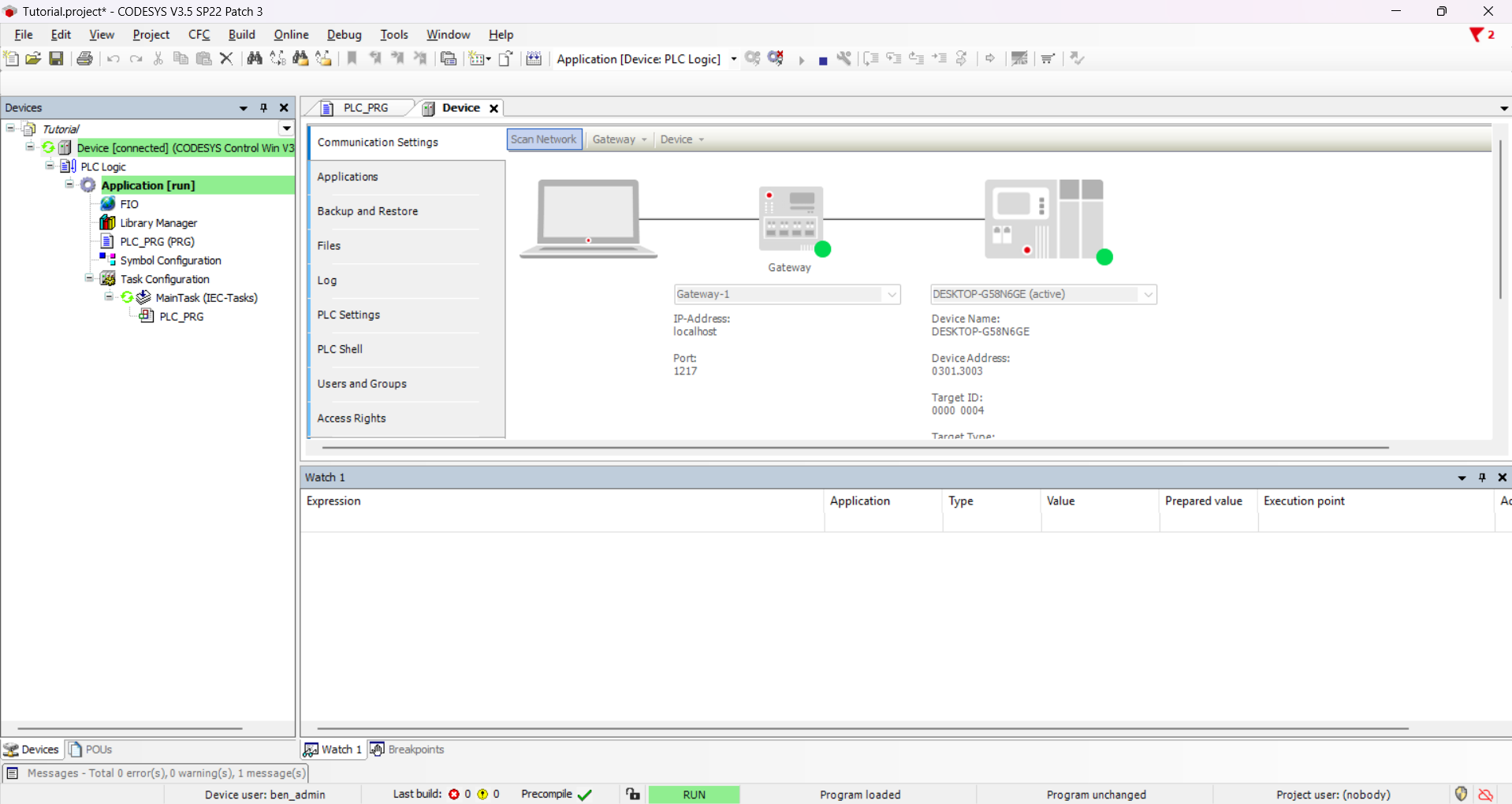
CODESYS Runtime Baseline
CODESYS shows a connected device and the application in RUN. This establishes the runtime baseline; the image does not show Factory I/O browsing or exchanging the 18 signals.
View source ↗
The Communication Settings view above shows the CODESYS gateway on port 1217. This is a different connection from the Factory I/O OPC UA endpoint on port 4840 in the setup record.
Failure 1: the client could not connect
The PLC application was in RUN, but Factory I/O could not establish an OPC UA session. Alongside the endpoint and symbol checks, I investigated certificates and user permissions. I initially looked under Communication Settings before finding the relevant permission controls under Access Rights.
The mismatch recorded in my notes was between a runtime requiring device user management and a sample configured for anonymous access. I suspected that the sample came from an older environment with different security defaults. That version explanation was a hypothesis, rather than something I established with a version-by-version comparison.
For this single-computer simulation, I made the following changes:
- Opened Device → Change Runtime Security Policy, made Device User Management optional and enabled anonymous login.
- Opened Access Rights and granted
Anonymous_OPCUAServerthe required permissions under RemoteConnections → OPCUAServer. - Rebuilt and downloaded the application, then confirmed that the SoftPLC was in RUN.
I retained the administrator account and kept passwords out of the repository and screenshots. Anonymous access was a local simulation choice. For an industrial deployment, I would use authenticated access with permissions limited to the required operations.
Observed result: Factory I/O connected and displayed all 18 FIO variables, as documented in the connection troubleshooting notes. This established that the client could reach and browse the exposed symbols. It did not yet establish that the scene’s saved I/O mappings worked.
Failure 2: browsing worked, but the mappings failed
With the connection established, Factory I/O reported:
Object reference not set to an instance of an object
The error message alone did not identify the cause. The useful observation was that the client could already browse all 18 variables. I therefore investigated the scene’s saved mappings before changing the PLC program.
The sample scene contained mappings from its original environment. My working hypothesis was that these mappings no longer matched the variables exposed by my runtime. To test that hypothesis, I:
- Saved a copy of the original scene and disconnected the OPC UA driver.
- Used CLEAR to remove the existing mappings.
- Browsed
opc.tcp://localhost:4840again, filtered forFIOand checked that all 18 variables were available. - Recreated the input and output mappings manually.
- Reconnected the driver and returned Factory I/O to RUN.
Observed result: the error disappeared and the 18 signals could be exchanged, according to the mapping repair record. Neither of these two fixes required changes to the PLC code. The result supported the mapping hypothesis, although the available record does not include a driver trace identifying the exact invalid reference.
What the evidence establishes
The available evidence has two distinct scopes:
- Runtime screenshot: the device is connected in CODESYS and the application is in RUN. It provides a visual baseline for the PLC side.
- Written troubleshooting record: the client browsed 18 variables after the access changes, and signal exchange worked after the mappings were recreated. These are recorded observations; the repository does not include a matching capture of every mapped signal changing.
These results establish a documented communication milestone in the simulation. They do not validate a complete sorting cycle, interlocks, jam detection or fault recovery. I would test those behaviours independently before reporting them as implemented and verified.
What I would carry into the next test
The most useful diagnostic step was separating runtime → endpoint → access → symbols → mappings → machine behaviour. A RUN indicator answered one question; a successful browse answered another. Neither justified skipping the remaining checks.
For the next validation pass, I would record the runtime and sample versions, start from a clean restart, capture the mapped inputs and outputs changing, and observe a complete sorting cycle. I would keep those results alongside the saved scene so the communication fix and subsequent sequence tests could be reviewed separately.
The Smart Conveyor Sorting Cell case study places this setup work within the wider PLC architecture and identifies the features still planned. The source links in this article point to a fixed repository revision so the supporting record remains traceable.