SCADA
Distribution Feeder SCADA Simulation
An 11 kV feeder simulation in Ignition Perspective, with breaker supervision, command-feedback validation and fault recovery.
- Project type
- Personal simulation
- My role
- SCADA configuration, control logic and testing
- Period
- Aug 2026
Feeder operation and fault simulation
A recorded Perspective session exercises the simulated feeder controls and fault scenarios. The project uses simulated Tags rather than a physical PLC or live electrical equipment.
View source ↗Demo highlights
- Breaker operation and telemetry
- Overload trip and reset
- Communications and command faults
Read video description
This silent recording follows operation of the Feeder 01 dashboard. Voltage, current, load and frequency appear above a breaker diagram. The operator uses open, close and trip-reset controls and the overload, communications-failure and command-failure switches. Status rows and the alarm table show the resulting changes. The technical sections below explain the control conditions and the supplied fault screenshots.
Overview
I built this simulation to practise feeder monitoring, supervisory control and fault diagnosis in Ignition Perspective. It combines an operator-facing view with simulated electrical measurements and deterministic control behaviour.
My work covered the Tag structure, Perspective bindings and event scripts, control interlocks, command-feedback checking, and alarm activation, acknowledgement and recovery.
Architecture & approach
The application runs within Ignition using a writable default Tag Provider. Commands, Measurements, Status and Simulation are separate Tag groups, keeping operator requests distinct from equipment feedback and fault injection.
Perspective presents measurements and status, while event scripts and expression bindings connect the controls to the simulation. The exported close-permissive expression checks remote mode, healthy communications, absence of a protection trip and load below its configured threshold.
Tag organisation
[default]Feeder01
├── Commands      Open / close / trip-reset requests
├── Measurements  Voltage / current / load / frequency
├── Status        Feedback / permissives / alarms
└── Simulation Fault switches / targets / timersCommand-feedback validation
A button request, an accepted command and breaker feedback represent different stages of an operation. Commands rejected by an interlock do not start the feedback timer because they have not been sent to the simulated device.
After a valid command is accepted, the logic waits for the expected breaker feedback. The project documentation describes a timeout of approximately two seconds; missing feedback raises a command-failure alarm.
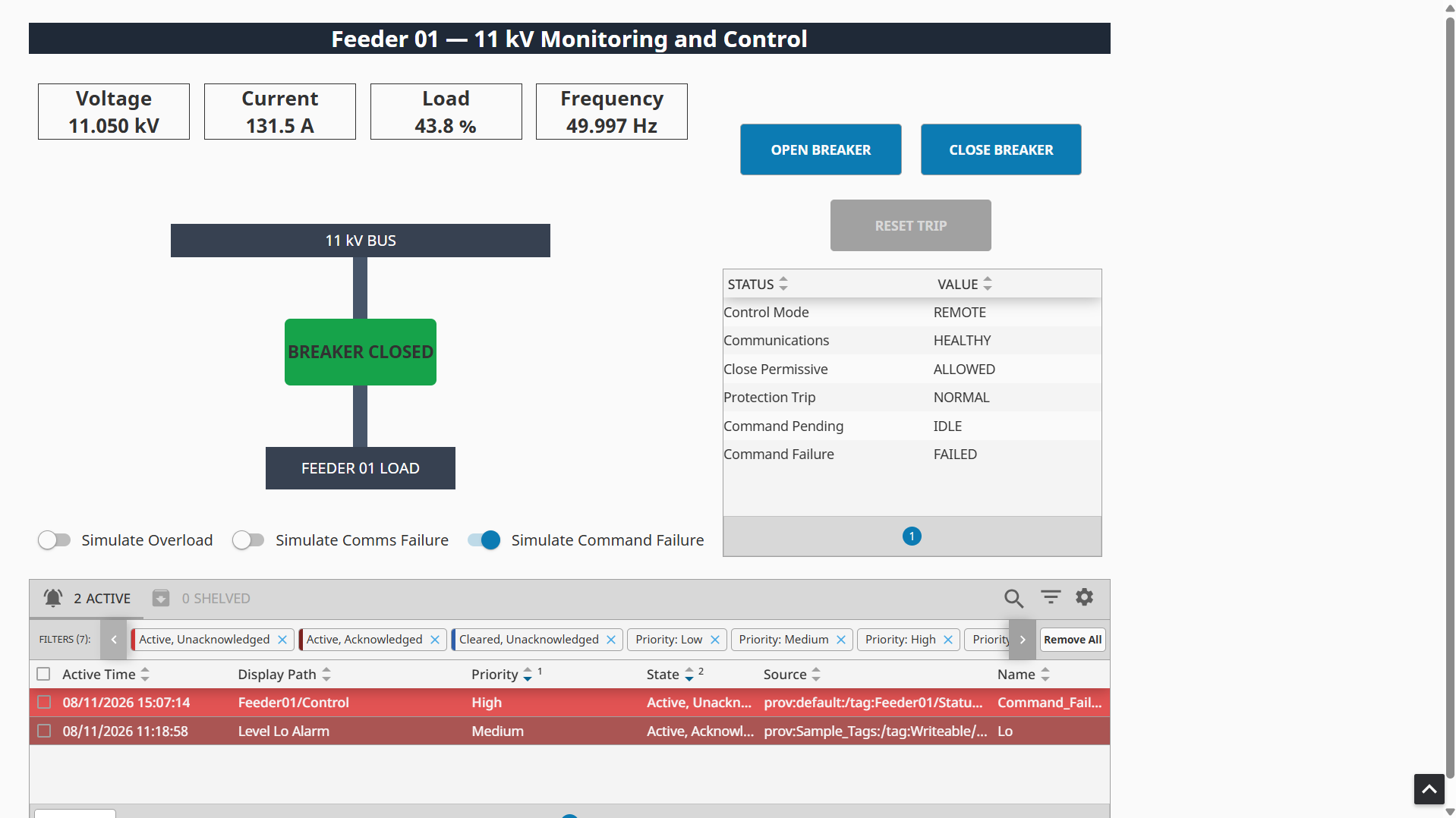
Breaker command failure
The enabled command-failure simulation leaves the breaker feedback unchanged while Command Failure is FAILED. The alarm makes missing feedback visible independently of the displayed breaker state.
View source ↗
Checking feedback separately from command acceptance helps reveal a failed operation instead of treating a button press as proof that the equipment moved.
Protection & recovery
A sustained simulated overload produces a high-load alarm and a delayed protection trip. The trip opens the breaker and prevents another close command until the overload is removed and the trip is reset.
Alarm acknowledgement and recovery are separate actions. Acknowledging an alarm records operator attention; removing the fault and restoring the appropriate state allows it to clear. A successful command retry clears the command-failure condition.
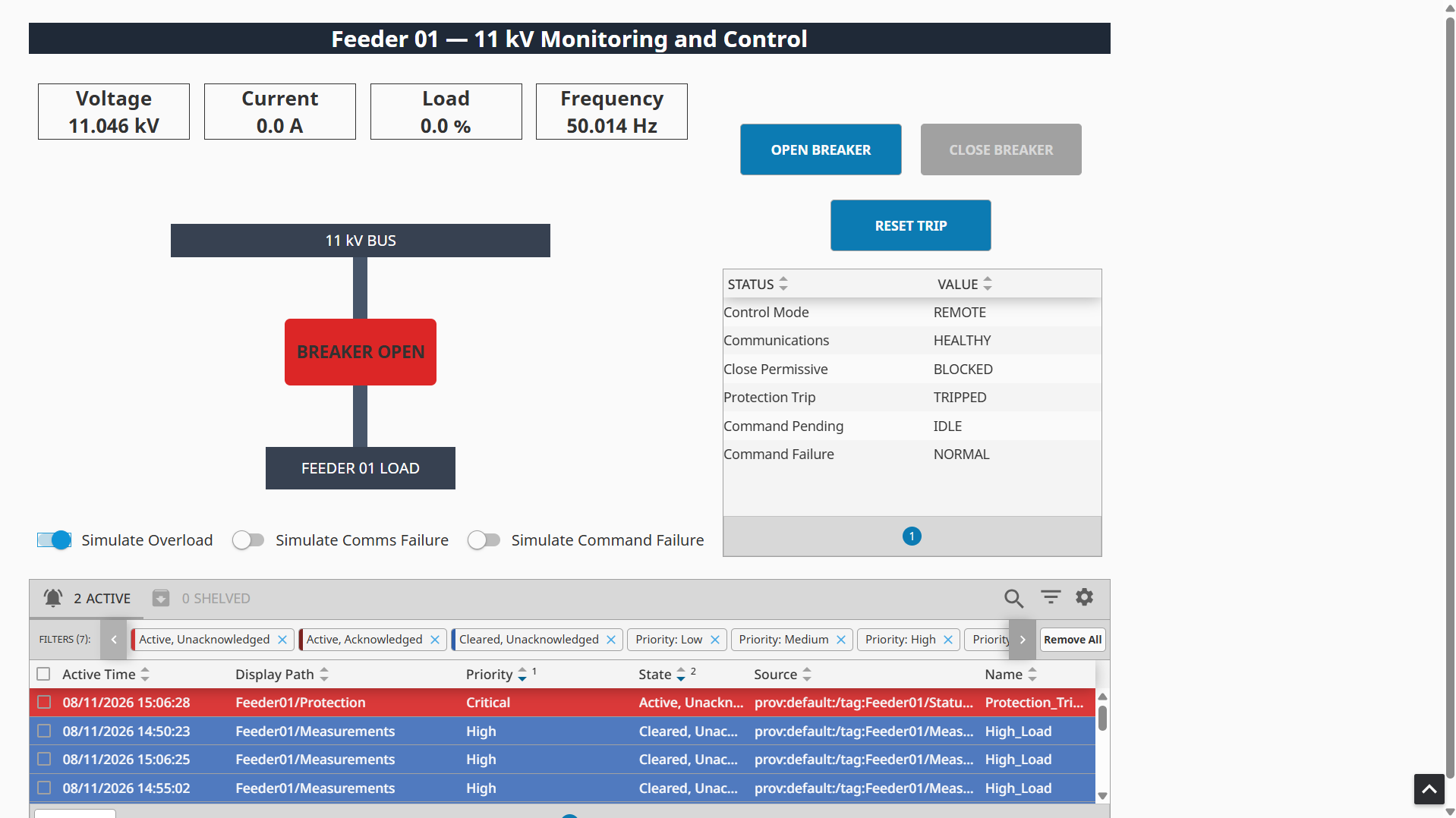
Protection trip and blocked closing
With overload simulation enabled, the breaker is open and the close control is disabled. The critical protection-trip alarm and blocked close permissive show how the trip state constrains subsequent operation.
View source ↗
The controls expose the reason an operation is blocked, while the alarm table retains the distinction between active, acknowledged and cleared conditions.
Testing & validation
Validation was performed through the Perspective session using simulated operating conditions. The repository records the scenarios below as tested; the linked recording and screenshots document the simulation, not production commissioning or site acceptance.
Normal breaker operation
- Expected behaviour
- Close and open requests change breaker feedback and the associated current and load measurements.
- Actual result
- The project test record reports successful open and close operation with the expected measurement changes.
Missing command feedback
- Expected behaviour
- An accepted command without matching feedback times out and raises a command-failure alarm.
- Actual result
- The supplied screenshot shows FAILED command status and an active, unacknowledged command-failure alarm.
Sustained overload
- Expected behaviour
- The protection logic trips the breaker and blocks closing until recovery and reset.
- Actual result
- The supplied screenshot shows the breaker open, the trip active and the close permissive blocked.
Communications loss and interlocks
- Expected behaviour
- Simulated communications loss freezes telemetry and disables control; rejected requests do not create command timeouts.
- Actual result
- Both behaviours are recorded as tested in the project README. The recording includes communications-failure simulation; a dedicated interlock trace is not supplied.
Acknowledgement and recovery
- Expected behaviour
- Alarms can be acknowledged, with clearing following recovery; the trip can be reset after overload removal.
- Actual result
- Acknowledgement, trip reset and successful retry are recorded as tested in the project README.
Outcomes & lessons
The implemented simulation brings telemetry, breaker supervision, interlocks, feedback checking and alarm handling into one operator view. It provided practical experience separating command intent from observed state and diagnosing fault conditions through Tags and alarms.
The model remains a learning environment with simulated equipment. Planned extensions include PLC connectivity through OPC UA, historical trending and operator action records; these are not implemented capabilities of this case study.